BIRP Is Deprecated: Migrate to URP Now or Wait for 6.7 LTS?
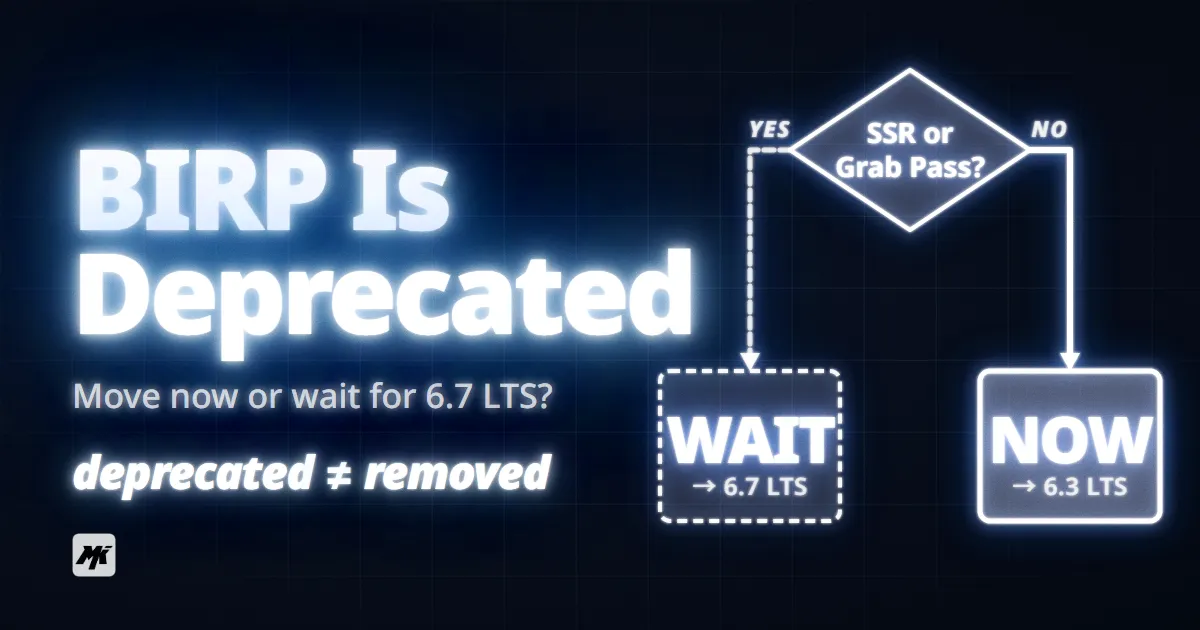
Unity deprecated the Built-in Render Pipeline (Built-in RP, BIRP) in 6.5, but your project doesn't have to move today. The real question is whether migrating now saves you pain or causes more of it, and the answer depends on your project stage, your shader situation, and which URP features you actually need.
BIRP to URP: Quick Decision Checklist
- Starting a new project? Use Universal Render Pipeline (URP) from day one. No reason to start on BIRP in 2026.
- Less than 6 months into production? Migrate now on Unity 6.3 LTS. The earlier you switch, the less rework you carry.
- Mid-production, shipping in 2026 or 2027? Check whether you need screen-space reflections or Grab Pass. If not, migrate now. If yes, wait for 6.7 LTS (late 2026).
- Shipping soon or already live? Ship on BIRP. Plan migration for your next project.
- VR project targeting Quest? Benchmark both pipelines on your actual scenes. BIRP still outperforms URP on some standalone VR hardware.
Skip ahead to the Five Scenarios section for detailed guidance on each situation.
Why This Decision Is Harder Than It Looks
If BIRP were simply disappearing tomorrow, the answer would be obvious: migrate now. But Unity gave developers a long runway, and URP still has real feature gaps. This creates a timing puzzle with no single correct answer.
Three factors make this difficult.
BIRP isn't gone yet. It remains available through Unity 6.7 LTS (expected late 2026), with long-term support extending to late 2028. Enterprise and Industry license holders get support through 2029. There is time to plan.
URP is good but not complete. Forward+ (a method that removes per-object light limits by sorting lights into screen-space tiles) and the GPU Resident Drawer (a system that lets the GPU manage draw calls directly, reducing CPU overhead) are the biggest performance gains in URP. Together, they make URP faster than BIRP in many scenarios. But features like screen-space reflections and Grab Pass (a BIRP technique that captures the screen as a texture, used for refraction and distortion effects) are not yet available in URP.
The migration tools work for simple projects but break on complex ones. Unity's Render Pipeline Converter handles standard materials and post-processing volumes, but custom shaders require full manual rewrites. And the converter itself has regressed in Unity 6.4, adding another layer of uncertainty.
The Deprecation Timeline: What Actually Happens When
Unity's February 2026 blog post, "Render Pipelines Strategy for 2026," sets the timeline. Deprecated does not mean removed.
| Version | Type | Date | BIRP Status |
|---|---|---|---|
| Unity 6.0 | LTS | October 2024 | Fully supported. URP 17 ships with Render Graph |
| Unity 6.1 | Update | April 2025 | Fully supported. Deferred+ rendering path added to URP |
| Unity 6.3 | LTS | December 2025 | Fully supported. Current recommended LTS |
| Unity 6.4 | Update | March 2026 | Fully supported. Converter tool regressions reported |
| Unity 6.5 | Update | Beta (April 2026) | Officially deprecated. Bug fixes only, zero new features |
| Unity 6.6 | Update | Mid 2026 (planned) | Fully supported. DLSS4 / FSR3 shared upscaling arrives in URP |
| Unity 6.7 | LTS | Late 2026 (planned) | Last version with BIRP. SSR and physical lighting arrive in URP |
After 6.7 LTS, BIRP receives long-term support (bug fixes only) through late 2028. No final removal date has been announced. Unity stated: "Before we decide for a final end date, we want to hear from you." Community speculation points to Unity 7, but Unity has not confirmed this.
High Definition Render Pipeline (HDRP) also stopped receiving new features as of Unity 6.5. HDRP gets only bug fixes and Nintendo Switch 2 support going forward. All rendering investment now goes into URP. If you are on HDRP, the migration question applies to you as well.
What URP Can and Cannot Do Right Now
Deciding when to migrate requires knowing where URP stands today (Unity 6.3 LTS) and what arrives in upcoming versions.
Features that are ready now
| Feature | What it does | Available since |
|---|---|---|
| Forward+ rendering path | Removes per-object light limits. Supports up to 256 lights per screen-space tile | Unity 6.0 |
| GPU Resident Drawer | GPU-side draw call management. Major CPU performance gain for instanced objects | Unity 6.0 |
| Render Graph | Automates GPU resource allocation and reduces memory overhead | Unity 6.0 |
| Deferred rendering path | Allows many lights without per-light performance cost | Unity 6.0 |
| Deferred+ | Improved deferred path with Variable Rate Shading | Unity 6.1 |
| Adaptive Probe Volumes | Per-pixel global illumination baking with streaming support | Unity 6.0 |
| SRP Batcher | Groups objects using the same shader variant into fewer draw calls | Unity 2019+, refined in 6.x |
Features still missing or coming
| Feature | Status | When expected |
|---|---|---|
| Screen-space reflections (SSR) | Not available in URP | Unity 6.7 LTS |
| Physical light units and auto-exposure | Not available in URP | Unity 6.5 or 6.7 |
| Grab Pass (screen capture for refraction) | No URP equivalent | No confirmed date |
| Multi-pass shader rendering | Works differently in URP. Requires Renderer Features instead of extra shader passes | Available, but requires rewrite |
| Camera stacking with Deferred path | Not compatible | No confirmed date |
| Real-time global illumination | Not available in URP | Unity 6.7 |
| DLSS4 / FSR3 shared upscaling | Planned | Unity 6.6 |
Performance is not a simple URP-is-faster story
URP outperforms BIRP in scenes with many lights, heavy instancing, and complex lit environments. But BIRP still wins on simple scenes with integrated GPUs and on some standalone VR hardware. One developer benchmarking identical VR scenes reported BIRP at 56.7 FPS with 25 batches versus URP at 34.9 FPS with 725 batches. Performance depends on your specific scene, not on the pipeline label.
Migration Tooling: What Converts and What Breaks
Unity's Render Pipeline Converter (Window → Rendering → Render Pipeline Converter) handles five categories: rendering settings, prebuilt materials, read-only materials, animation clips, and Post Processing Stack v2 volumes. For projects using only Unity's standard shaders, it works well on Unity 6.0 through 6.3.
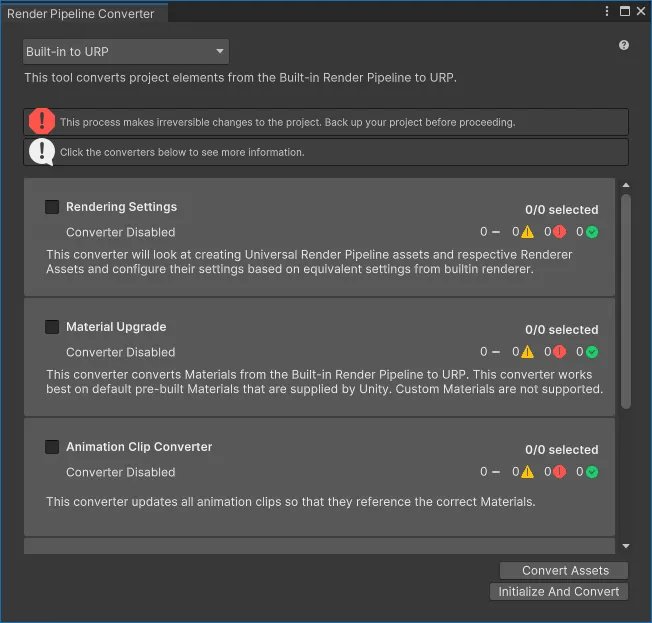
Source: Unity Manual — Render Pipeline Converter
What converts automatically
- Standard BIRP materials to URP Lit/Unlit equivalents
- Post Processing Stack v2 volumes to URP Volume components
- Rendering settings and quality presets
- Animation clips referencing standard material properties
What needs manual work
Custom shaders are the biggest cost. Every custom BIRP shader must be rewritten by hand. The changes include:
- Replacing
CGPROGRAMblocks withHLSLPROGRAM - Swapping
UnityCG.cgincincludes forCore.hlsl - Adding
RenderPipeline=UniversalPipelinetags - Wrapping properties in
CBUFFERblocks for SRP Batcher compatibility - Replacing functions like
UnityObjectToClipPoswithTransformObjectToHClip
Surface Shaders, the backbone of many BIRP projects, are not supported in URP at all. They must be recreated in Shader Graph (Unity's node-based shader editor) or rewritten as raw HLSL.
The Render Pipeline Converter has regressed in Unity 6.4. Community reports confirm the right-click "Convert Selected Built-in Materials to URP" option was removed, and batch conversion is unreliable. If you plan to use the converter, stay on Unity 6.3 LTS until Unity fixes the tooling in a later version.
Estimating your migration effort
| Situation | Estimated effort |
|---|---|
| Standard shaders only, small project | 1 day or less with the converter |
| Standard shaders, 50+ materials | 1 week (converter + manual verification) |
| Some custom shaders (under 10) | 2 to 4 weeks per shader, depending on complexity |
| Heavy custom shader project (10+) | 1 to 3 months. Consider phased migration |
| Surface Shader dependent | Add 1 to 2 weeks per Surface Shader for Shader Graph recreation |
Five Scenarios, Five Answers
The right timing depends on where your project sits right now. Find your situation below.
New project starting now
Use URP from day one. There is no technical or strategic reason to start on BIRP in 2026. Unity's own documentation "strictly does not recommend it for any new titles." Starting on BIRP means starting with debt.
Early production (less than 6 months in)
Migrate now on Unity 6.3 LTS. At this stage, you have relatively few BIRP-specific assets and shaders to convert. Every week you continue on BIRP adds to your eventual migration cost. The converter tool works reliably on 6.3, so take advantage of it before tooling changes in later versions.
Mid-production, shipping in 2026 or 2027
This is the hardest call. Check your feature dependencies:
- If your project does not use screen-space reflections, Grab Pass, or complex multi-pass shaders, migrate now on 6.3 LTS. URP has everything else you need.
- If you depend on SSR or Grab Pass, wait for Unity 6.7 LTS (late 2026). SSR and physical lighting are confirmed for that release.
- In either case, start auditing your custom shaders now. The audit takes time and is useful regardless of when you migrate.
Late production or shipping soon
Ship on BIRP. Migration introduces risk, and the last months before release are the worst time to take it. BIRP will continue receiving bug fixes. Plan your URP migration for the next title, and use the remaining BIRP support window to train your team and prototype the conversion in a branch.
Live service game on BIRP
Begin planning for a 2027 migration. You have guaranteed support through late 2028 (2029 for Enterprise). Use that time to:
- Audit every custom shader and categorize by conversion difficulty
- Prototype the migration in a separate branch on Unity 6.7 LTS
- Budget for 1 to 3 months of shader rework depending on project complexity
- Watch for converter tool improvements in 6.5 and 6.6
When Migration Isn't the Real Problem
Sometimes the BIRP vs. URP question is a distraction from a deeper issue.
"I'm on HDRP, not BIRP." HDRP is also in maintenance mode with no new features. If your project needs volumetric lighting, ray tracing, or PCSS shadows, HDRP is still the only Unity option, but it is a dead end for long-term development. URP is expected to absorb these features over time, but no timeline is confirmed beyond 6.7.
"My real problem is Asset Store compatibility." Many Asset Store packages still ship as BIRP-first. Unity is pushing publishers toward URP-compatible defaults, and the deprecation announcement will accelerate this shift. If you are waiting for specific assets to support URP, check their update history. Assets that have not added URP support by mid-2026 may never do so.
"I'm considering switching engines entirely." If BIRP deprecation is the only reason, that is an overreaction. If your project already strained against Unity's rendering limitations and HDRP's freeze removes your last reason to stay, that is a different conversation worth having.
Common Misconceptions
No. BIRP is deprecated in 6.5, which means no new features. It remains available through 6.7 LTS, with long-term support bug fixes continuing until late 2028. Deprecated and removed are different things.
Not true. URP is faster in scenes with many dynamic lights and heavy instancing, thanks to Forward+ and GPU Resident Drawer. But on simple scenes, integrated GPUs, and standalone VR hardware, BIRP can still outperform URP. Always benchmark your actual project before deciding based on performance claims.
The converter handles standard materials well, but custom shaders require full manual rewrites. Surface Shaders have no automated conversion path at all. And the converter has regressed in Unity 6.4+, making 6.3 LTS the most reliable version for automated conversion right now.
Not necessarily. Unity 6.3 LTS is the most stable option today. The converter tool is broken in 6.4, and 6.5 is still in beta. For production migration, target an LTS release: 6.3 if you can work within current URP limits, or 6.7 when it ships.
Only if your project does not rely on HDRP-exclusive features like volumetric fog, PCSS shadows, or ray tracing. URP does not yet match HDRP's high-end rendering capabilities. Moving from HDRP to URP prematurely could mean losing visual features your project depends on.
When This Applies
This guide covers Unity projects deciding between staying on BIRP and migrating to URP, based on Unity's February 2026 deprecation announcement. The timeline and feature information reflects Unity 6.0 through 6.5 beta (April 2026).
If your project uses HDRP and you are evaluating whether to move to URP, the decision criteria and timeline sections still apply, but your feature dependency check will be different. A dedicated HDRP migration guide is planned.